Hokkaido Area GuideChitose & New Chitose Airport
New Chitose Airport Wi-Fi, ATMs and Currency Exchange: Get Online and Get Cash on Arrival
This article contains ads (affiliate links). If you book or buy through these links, COTARU, the operator of this site, may receive a commission.
When you land at New Chitose Airport, the first things to sort out are connectivity and cash. Once those are done, checking trains and buses, contacting your hotel, and paying where cards are not accepted all become easier.
This guide covers the free Wi-Fi, ATMs, currency exchange, and mobile Wi-Fi and SIM counters, checked against the airport's official pages. It is for first-time visitors to Hokkaido, travelers arriving from abroad, and anyone in a hurry.
Key points
- The free Wi-Fi is NewChitose_Airport_Free_Wi-Fi, available in both terminals and the connecting facility, but it is not encrypted
- The airport's page says foreign-issued cards work at Seven Bank, AEON Bank, Japan Post Bank and Lawson Bank ATMs, among others
- Currency exchange is on domestic 1F and international 2F and 3F; currencies handled differ by store
- Connectivity first, then cash, then transport, and Otaru will be much easier

The Short Answer: Connectivity, Then Cash, Then Transport
- Free Wi-FiNewChitose_Airport_Free_Wi-FiBoth terminals and connecting facility
- International ATMs2F and 3FForeign-issued cards accepted
- Currency exchange6 places3 domestic, 3 international
| Check | Where in the airport | Watch out for |
|---|---|---|
| Connectivity | Free Wi-Fi, SIM, mobile Wi-Fi | Not encrypted; use a VPN or mobile data for sensitive tasks |
| Cash | ATMs, currency exchange | Foreign-card support and currencies differ by machine and store |
| Transport | JR and bus counters | Check times once you are online |
This image was generated by AI for illustrative purposes.
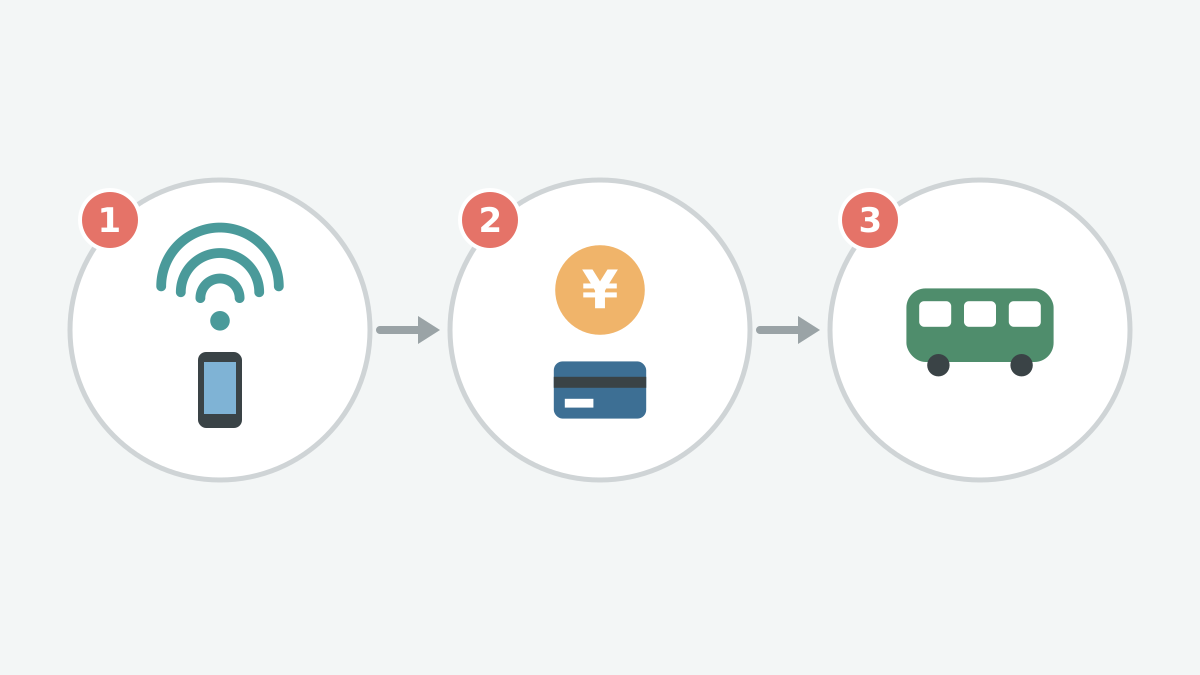
The diagram below shows the order to sort things out before leaving the airport: 1 connectivity (Wi-Fi, SIM), 2 cash (ATM, exchange), 3 transport. Once you are online you can look up ATMs and train times too.
This image was generated by AI for illustrative purposes.
Free Wi-Fi: Name and Cautions
The network name (SSID) is NewChitose_Airport_Free_Wi-Fi. It works in the domestic and international terminals and the connecting facility.
- Set your device's IP address and DNS server to "automatic" (if you changed them by hand, note the original settings first)
- When you connect, accept the terms of service of NTT Broadband Platform, which provides the service
- If it won't connect, toggle Wi-Fi, switch off your VPN for a moment, or restart your device
The network is not encrypted. It is fine for maps and timetables, but use a VPN or mobile data for card numbers, banking or work. The airport also recommends a VPN or a paid public Wi-Fi for secure communication. Support is NTT Broadband Platform (0120-261-065, 10:00–17:00, closed weekends, holidays and year-end/New Year).
SIM and Mobile Wi-Fi Counters
If free Wi-Fi isn't enough, you can rent mobile Wi-Fi or buy a SIM. The counters on the airport's page are below. Prices are not listed, so check each company's site or phone.
| Where | Counter | Hours | What you can do |
|---|---|---|---|
| Domestic 1F | Imoto WiFi | 9:00–18:00 (closed 13:00–14:00) | Rental pickup and same-day rental, SIM sales |
| Domestic 1F | WiFiBOX, Anyfone Japan | Terminal opening hours | Domestic router pickup and return only |
| International 2F | Imoto WiFi | 9:00–19:00 | Rental pickup and same-day rental, SIM sales |
| International 2F | Telecom Square | 9:00–17:00 | Rental pickup and same-day rental, SIM sales |
| International 2F | Global WiFi | Counter 9:00–19:00 (locker pickup 7:00–18:30) | Rental pickup |
| International 3F | Anyfone Japan | Terminal opening hours | Domestic router pickup and return only |
For a short trip using maps, translation and social media, a SIM works well. For families or several devices, mobile Wi-Fi is better. Check SIM lock and eSIM support before you buy.
ATMs: Where, When and Foreign Cards
There are ATMs in both terminals. The airport's page marks these as accepting cards issued overseas:
| Where | Bank | Hours | Foreign cards |
|---|---|---|---|
| Domestic, south and north | Seven Bank | 6:20–23:00 | Yes |
| Domestic, south and north | Japan Post Bank | South 6:20–23:00; north weekdays 7:00–23:00, Sat 8:00–23:00, Sun/holidays 8:00–21:00 | Yes |
| Domestic, south and north | Lawson Bank | 6:00–23:00 | Yes |
| Domestic, south | AEON Bank | Terminal opening hours | Yes |
| International 2F | Seven Bank | 6:00–21:00 (every day) | Yes |
| International 2F and 3F | AEON Bank | Terminal opening hours | Yes |
| International 3F | Hokuyo Bank | 7:00–21:00 | Yes |
On domestic 2F there is also a Hokuyo Bank counter (weekdays 9:00–12:30 and 13:30–15:00, closed weekends and holidays). Whether a foreign card works also depends on its brand, issuing country, withdrawal settings and limit. For early mornings, evenings and right after an international arrival, check the hours shown on the machine.
Currency Exchange: Where to Go
There are six exchange points across the two terminals:
| Where | Shop | Hours |
|---|---|---|
| Domestic 1F arrivals (ANA side) | Travelex | 7:15–20:00 |
| Domestic 1F arrivals (JAL side) | Travelex | 9:00–17:00 |
| Domestic 1F north and south | SMART EXCHANGE (machine) | Terminal opening hours |
| International 2F | SMART EXCHANGE (machine) | Terminal opening hours |
| International 2F arrivals lobby | Travelex | 8:30–19:00 |
| International 3F departures lobby, north | Travelex | 9:30–16:00 |
The two staffed international stores may change their hours when flights change. Currencies handled differ by store, so check first for anything other than US dollars or euros, small notes or large amounts. If you head straight to Otaru, you can exchange only what you need here and find another place in Sapporo or Otaru for the rest.
Checklist Before You Head to Otaru
| Check | Target |
|---|---|
| Wi-Fi or SIM works | You can use maps, translation, JR status and contact your hotel |
| You have some yen | For lockers, buses, taxis and small shops |
| You know what to do with your bags | Locker, delivery or straight to the hotel (locker and luggage guide) |
| You checked transport | JR Rapid Airport or bus, and your arrival time |
The basic routes to Otaru are in getting from New Chitose Airport to Otaru. For how to use each floor of the international terminal, see the international terminal guide.
Map
FAQ
What is the airport's free Wi-Fi called?
NewChitose_Airport_Free_Wi-Fi. It works in the domestic and international terminals and the connecting facility.
Is the free Wi-Fi safe?
It is not encrypted. The airport advises using a VPN or mobile data for card details or work.
Which ATMs take foreign-issued cards?
The airport's page says Seven Bank, AEON Bank, Japan Post Bank and Lawson Bank ATMs accept cards issued overseas, and so does the Hokuyo Bank ATM on 3F of the international terminal.
Where can I exchange currency?
Two Travelex counters and exchange machines on domestic 1F, and an exchange machine, an arrivals lobby store and a departures lobby store in the international terminal.
Can I rent a SIM or mobile Wi-Fi at the airport?
There are counters on domestic 1F and international 2F and 3F. Prices differ by company, so check each company's site or phone.
Summary: Get Online and Get Cash Before You Leave
New Chitose Airport has free Wi-Fi, ATMs, currency exchange and SIM and mobile Wi-Fi counters. The free Wi-Fi is not encrypted, so use a VPN or mobile data for anything important. Five to ten minutes of preparation here will make your time in Otaru easier.